Why an AI Tutor That Draws While Explaining Beats Static Chatbots
Discover why watching a tutor sketch diagrams stroke-by-stroke with synchronized voice narration accelerates STEM comprehension over static text and video.
Level: Middle School, High School, College
In this guide
Quick answer
An AI tutor that draws builds a live visual whiteboard in teaching order while narrating out loud. By presenting visual diagrams and spoken explanations simultaneously without split-attention, it leverages Dual Coding Theory to cut cognitive load and help students retain complex STEM concepts.
The Cognitive Science Behind 'Drawing While Explaining'
Educational psychologists have long studied how students process technical information. According to Paivio's Dual Coding Theory and Sweller's Cognitive Load Theory, human working memory processes verbal and visual channels separately. When a student is confronted with a dense block of text alongside a static, highly complex diagram, their working memory becomes overloaded trying to cross-reference labels and equations.
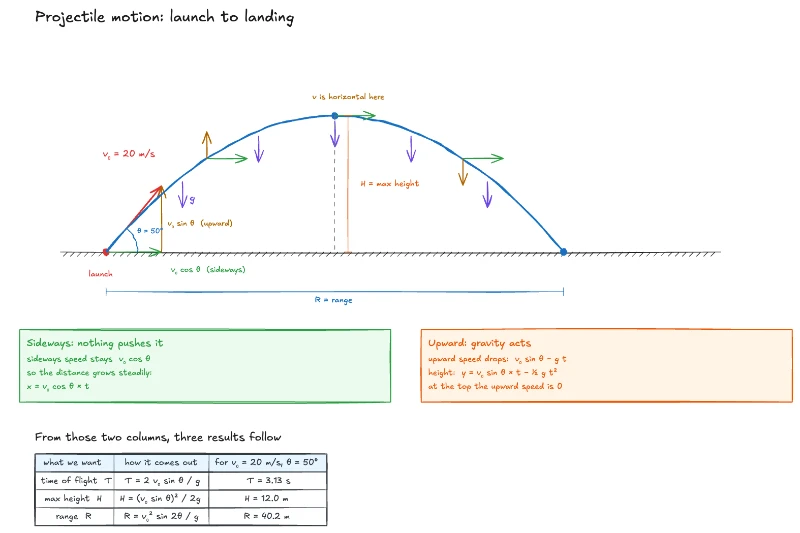
In contrast, when an explanation is constructed dynamically—where a line is drawn at the exact second the teacher speaks about that boundary, or a vector extends when discussing velocity—both channels reinforce each other. This eliminates the 'split-attention effect' and dramatically accelerates conceptual comprehension.
Why Pre-Recorded Videos and Static Images Fall Short
Recorded video lessons on YouTube or Khan Academy are wonderful, but they have one massive drawback: they answer the instructor's specific example, not yours. If your homework assignment has an inclined plane at 37° with friction, a video about a frictionless 45° ramp leaves you struggling to translate the steps.
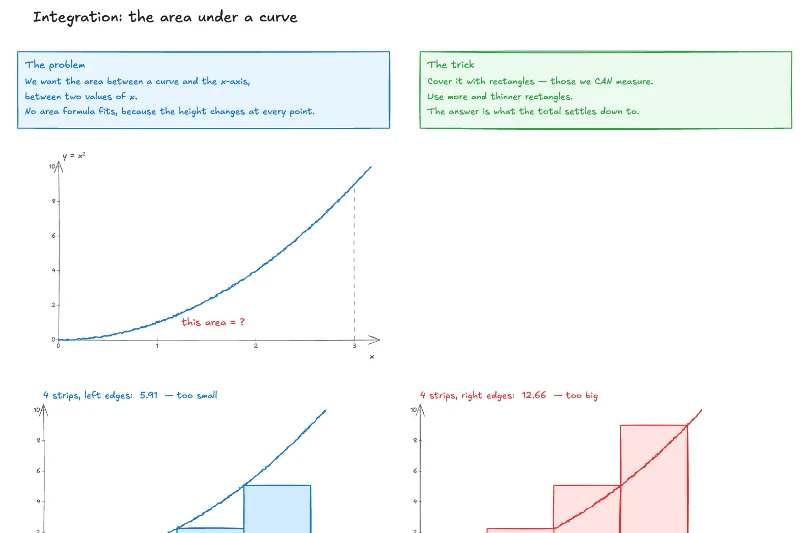
Static image generators, on the other hand, produce single 'all-at-once' pictures. They cannot show mathematical derivations or intermediate physics stages. What students actually need is an on-demand tutor who can take their exact question and sketch the explanation on a whiteboard right in front of them.
Inside Claryfied: The AI Whiteboard Engine
Claryfied was engineered from the ground up to bring whiteboard pedagogy to online learning. Unlike generic chatbots, Claryfied uses a specialized AI engine that writes drawing code for an interactive Excalidraw canvas while planning synchronized narration beats.
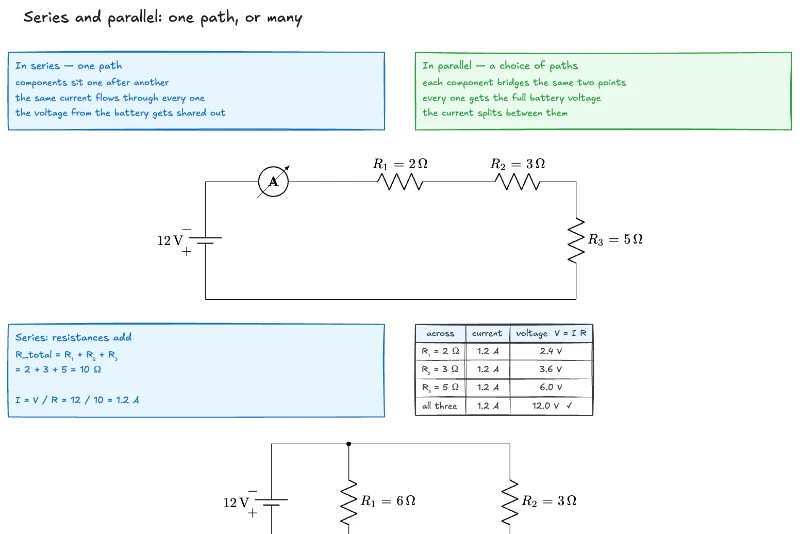
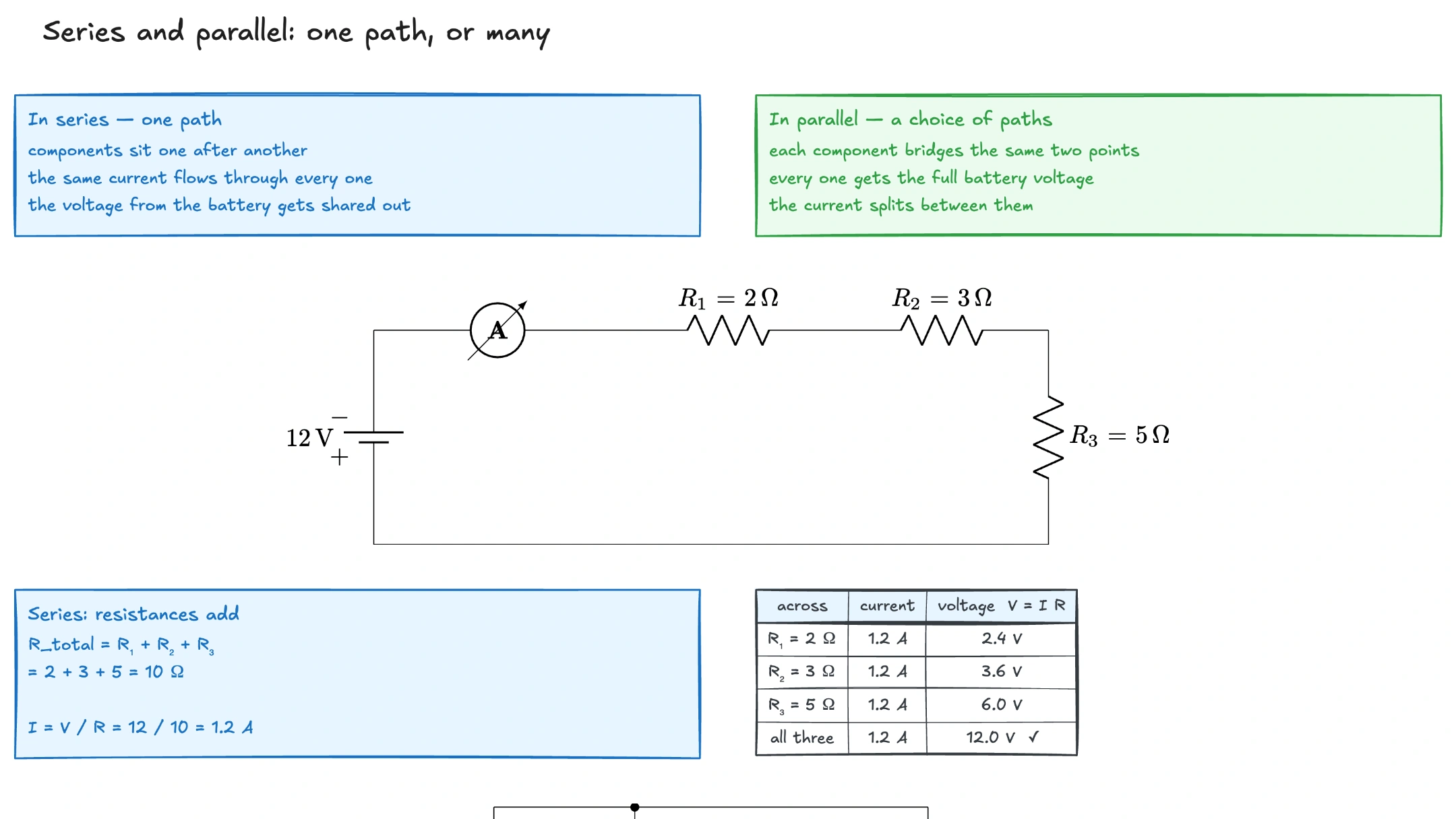
When you ask a question like 'How do series and parallel circuits differ?', Claryfied does not dump formulas. It first draws the battery, wires the series resistors, highlights the single current path in color, and calculates total resistance. Then it sketches the parallel branches, shows the current splitting at junctions, and explains why adding branches decreases equivalent resistance.
The student hears natural, human-paced speech while the ink appears on screen. Each beat can be paused, re-listened to, or annotated with your own stylus or mouse.
Transforming Homework from Frustration to Flow
When students can watch their exact homework question drawn out and explained, fear of difficult STEM topics disappears. Instead of guessing formulas or relying on homework solver apps that encourage academic dishonesty, students see the logical derivation and develop authentic confidence.
Experience it for yourself: watch Claryfied sketch and narrate series and parallel circuits in our live sample, or sign up to get 5 free interactive lessons tailored to your own questions.
What to remember
- Static diagrams force learners to decipher finished complexities; progressive drawing reveals the exact sequence of reasoning.
- Synchronizing spoken narration with ink placement eliminates the split-attention effect described in cognitive load theory.
- Interactive AI whiteboards allow customized pace, repetition, and targeted follow-up questions.
- Claryfied turns any STEM question into a live, narrated Excalidraw lesson with 5 free lessons for every new student.
Frequently asked questions
Does Claryfied generate a brand new whiteboard lesson for every question?
Yes. Claryfied generates custom diagram geometry, labels, and synchronized narration tailored specifically to the exact question and numbers you enter.
Can I annotate or draw on the Claryfied board myself?
Yes! Claryfied runs on an interactive Excalidraw canvas, allowing you to highlight, write notes, draw your own diagrams, and export the entire board as a high-resolution PDF or image.
How long does it take for Claryfied to draw a lesson?
Claryfied starts streaming the lesson within seconds. As the AI plans the strokes, introductory narration begins immediately so there is zero dead air, followed by a smooth stroke-by-stroke reveal.
Watch Series & Parallel Circuits Get Sketched Live
Play this complete interactive lesson free—drawn and narrated from start to finish. Or enter your own homework problem to get 5 lessons free.